
How to Keep a Time Log?
Keeping a time log is a simple and effective way of tracking your time. It can help to analyze how you spend your time and whether you’re being productive. You can record time for all types of activities—work, personal tasks, events of all kinds, house chores, and more.
Let’s dive into the idea of tracking hours spent at work with time tracking apps and how to do it the right way.
What Is a Time Log?
There’s not much philosophy behind the term “time log”. A time log is a set of chronological events written down in a table with columns, usually a timesheet, Excel spreadsheet, or on paper.
Time logs can include different categories, sub-categories, important activities, daily tasks, work hours, leisure time, phone calls, and any other activities you decide to track time for.
Time logs, or time tracking apps, are kept to record time for billable hours, monitor and manage employee attendance, better allocate time and money, and improve project management processes in teams.
Also, many people track time to improve time management and have an accurate picture of how much time they dedicate to each activity.
How to Keep a Time Log?
Keeping a time log is easy as long as you do it the right way. If you log your hours regularly, you ensure you enter the correct numbers and bill your clients accurately or easily improve personal productivity.
And with the automatic time tracker, you don’t even have to think about logging your time, because once you hit the start button, the time tracking app does it for you!
In general, there are three ways to keep a time log:
- Traditional time diary written in a spreadsheet, be it Excel, a template, a simple table in Word, etc.
- Time tracking software with timesheets and more advanced functionalities that let you track work progress in real-time (a web app, desktop apps, or mobile app),
- Project management tool with built-in time tracker,
- Paper timesheets (a time log template) are usually used by creative people to log time, write down to-do lists, and other important activities. People often use fancy bullet journals, sticky notes, highlighters, stickers, and other creative elements to liven up their planning experience.
You can also combine different methods depending on your needs, type of work, tools and methodologies you use in your work.
Why Use Time Tracking and Keep a Time Log?
Keeping a time log is much more than just recording your work hours. It’s an effective time management technique that helps to better plan and organize workload.
It can bring many benefits that contribute to the growth of business and personal career:
- Better time management: with a time tracking system, you can understand how you work and how much time tasks, projects, and activities required to complete them,
- Accurate tracking of billable hours: with a time log, it’s easy to keep track of billable and non-billable hours, also for different rates for all your projects
- Profitability: when tracking billable time, controlling productivity, and monitoring overall performance, you can ensure high profitability of projects and whether they are suitable for you
- Improved productivity: keeping a time log helps to spot and eliminate time wasters, and distractors, and, as a result, boosts productivity
- Better work-life balance: when you monitor your work hours with a time log, control productivity, and better manage time, you’re able to keep a healthy line between work and personal life
Cyrus Partow from ShipTheDeal.com says that using time management software has helped with both efficiency and productivity at the workplace.
And that’s the bottom line—keeping a time log aims at helping you better manage your time and plan work so you can get the most out of your day.
Best Time Tracking Apps to Track Work Hours
It’s important to align your time log system with the size of your team—you’ll have different needs when leading a small team, more challenges with a large team, and completely opposite necessities when you work as a freelancer.
1. TimeCamp
Best time tracking software for precise billing and comprehensive project profitability analysis

TimeCamp is a free time tracking app for unlimited users with unlimited projects and tasks. It’s a robust, flexible solution that automatically tracks your time and (optionally) collects all the data to complete timesheets and create comprehensive reports that provide you with analytics on how you spend your time.
TimeCamp helps automate and optimize tedious tasks, manage time more efficiently, and create accurate estimates for your projects based on total hours spent on tasks.
Key features:
- Automatic time tracker available as a desktop app, built-in web timer, mobile app, Time Clock Kiosk, and Google Chrome extension (all these apps are free to use)
- Tracking billable and non-billable time with different hourly rates
- Timesheets with approvals; you can also add and edit time entries manually
- Customizable reports with rich task and project progress information (time tracked, estimates, users, tasks, time entries, projects, budget, summary reports, billable, unbillable time, invoiced, cost calculation, computer time reports, and more)
- Invoicing that allows you to generate invoices for specific task or project,
- TimeCamp allows you to easily manage task dependencies with projects, tasks, subtasks, and tags (tags let you flexibly adjust the software and project structure to the way you want to track your time and organize projects’ data—categorize, mark, label clients, tasks urgency, project stage, overtime, department, add priority, and more)
- Analytics allows you to view the breakdown of your activities with tracking data graphs and statistics
- Attendance module to track and manage holidays, sick leave, business trips, parental leave, vacation leave, remote work, and more
- You can monitor productive and nonproductive work (including activities, websites, and applications)
- Automatic reminders when you forget to turn your timer on or off
- TimeCamp integrates with various tools (project management, task management, collaboration, IT, sales, CSM, etc.) and apps for a smooth work
Keep a neat time log with an automatic time tracker
Sign up for TimeCamp for free!
2. Actually
A good time tracking app for keeping daily time logs
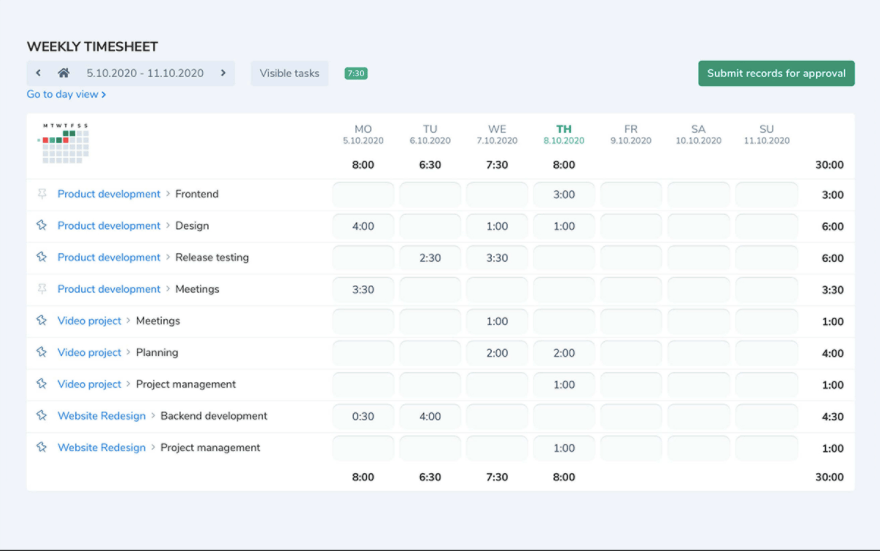
Actually is an easy-to-use time tracking tool that lets you keep a simple time log and monitor the time you and your team spend on work.
The app allows you to create projects, track hours worked and display the total duration for all tasks. Actually doesn’t offer additional time tracking features, so it’s best for companies that need a basic solution to keep a time log.
Key features:
- Basic timesheets with approvals
- You can set up a workday length
- Choose a calendar for a specific country with national holidays
- Add a budget for each task
- Overall hours reports—day, week, monthly time, and year; you can also export your report into a spreadsheet
Pricing: Actually offers a free 14-day trial. After the trial, you need to subscribe at 4€ per person/month.
3. Atto
Time log and GPS tracking app
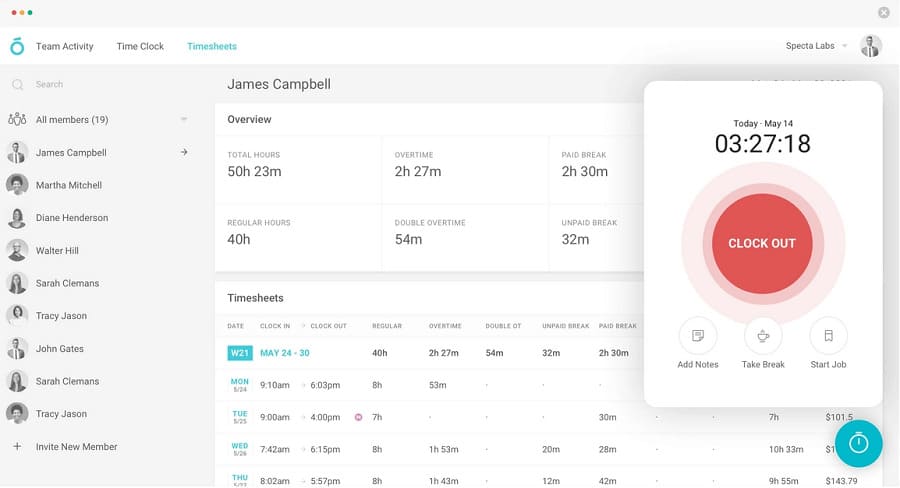
Atto is a timesheet and time tracking software for teams. It’s most suitable for field workers, remote employees, and people working out of the office as it provides GPS tracking and a virtual time clock.
Atto automates logging work hours so your team can focus on productive tasks. They can easily clock in and out from mobile devices and easily record time. With Atto, you can know employee location whenever they start work or begin a new activity on site.
Key features:
- Simple, accurate timesheets with time logs including clock in and out times, regular hours, overtime, double OT, unpaid and paid break, time off, and total hours
- Real-time location updates
- Smart location and time-based reminders
- Geofencing with GPS location tracking
- Log time via the web app, on the go with the mobile app, or at job sites via the time clock kiosk
- Productivity reports with team activity and daily reports that help to analyze the performance
Pricing: Atto is $7/ user / month for up to 99 users.
4. TimeLog
PSA software with time tracking for managing core business processes
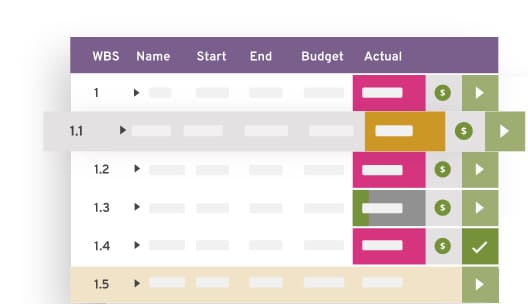
TimeLog is a Professional Services Automation platform (PSA), a time tracking app most suitable for larger teams. It lets you manage projects, track time and expenses, and invoice customers.
TimeLog helps to keep a digital time log with all the important information instead of writing things down manually. It’s a unified system for managing employee hours, project finances, and getting actionable insights on business performance.
Key features:
- Time tracking apps for mobile, desktop, or web
- Timesheets with time logs that include details about projects and their duration
- Salary time management in TimeLog lets you create and manage complex salary time rules, e.g., overtime, time off in lieu, holidays, absence
- An overview of entire organization lets you see work progress and whether work is fairly distributed among employees
- Create invoices based on time logs
- Over 80 different reports with different values and data
- Use templates to create projects or create your own projects from scratch
Pricing: TimeLog offers a free version with basic time tracking. For more advanced features you need to sign up for one of the paid plans. Pricing starts at €8/user/month (without the invoicing module).
5. Toggl Track
Simple timesheet app
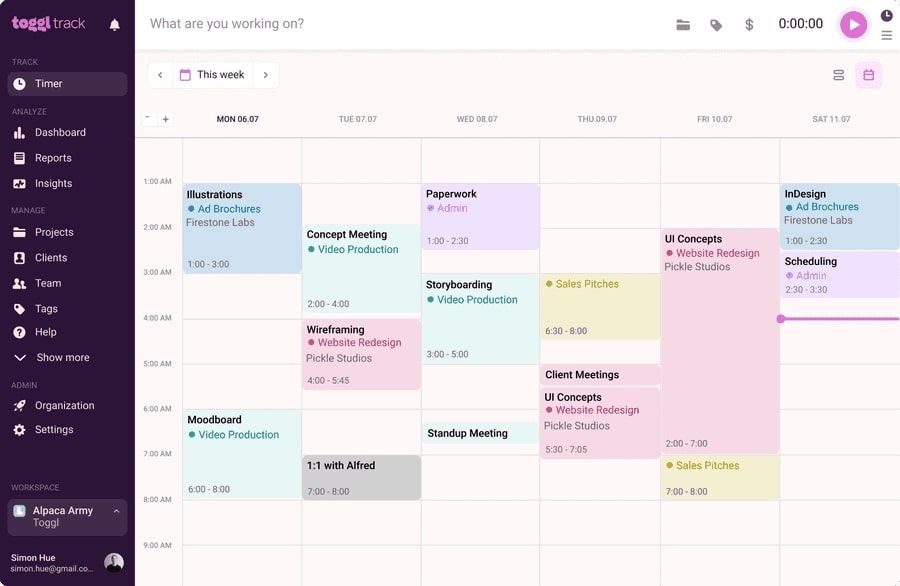
Toggl Track is a simple time tracking tool. It’s most suitable for people who need a straightforward system for tracking hours. It tracks your time spent on different tasks and projects and provides you with basic reports.
However, Toggl Track has its limitations and works best as a simple time log template. It’s a good alternative for manually tracking time.
Key features:
- Automatic time tracking with a desktop app that works in the background
- Simple project dashboard with all the basic information about your projects
- Pomodoro timer
- Idle detection
- Simple reports with timesheet apps and graphs displaying time spent on certain tasks
- Simple team dashboard
- Pricing: Toggl Track offers a free plan but functionalities are limited. For more advanced features, you need to sign up for one of the paid plans. Pricing starts at $10 per user per month.
6. WakaTime
Activity dashboards for developers
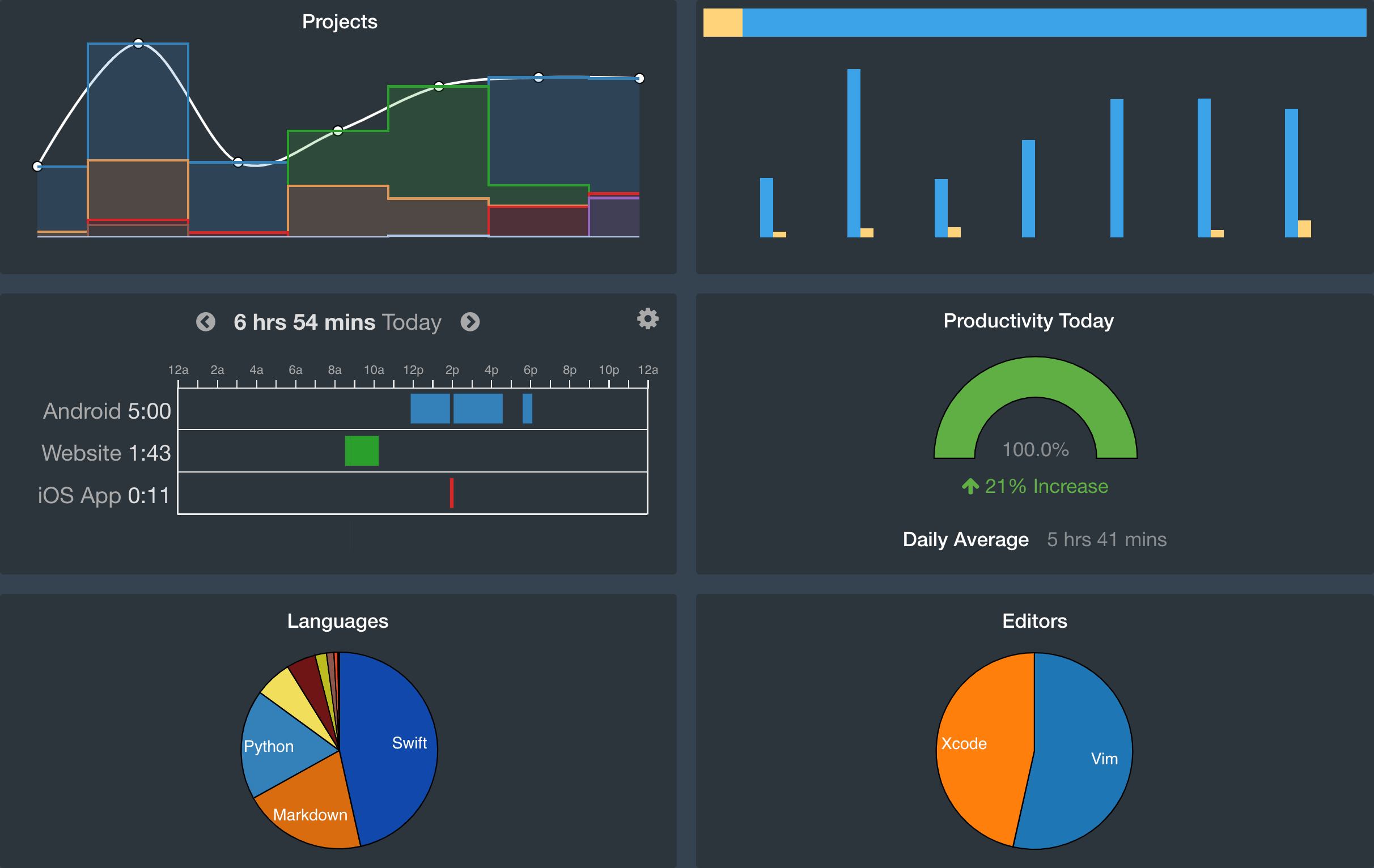
WakaTime is a collection of open-source IDE (integrated development environment) plugins for insights about your programming. It’s a good solution if you want to keep a time log with details on your coding activities.
The tool is simple and user-friendly. If you need to find out how much time you spent on coding, without any additional features, try WakaTime.
Key features:
- It automatically tracks logged hours whenever you start or stop working on them with metrics on a project, file, branch, feature, editor/IDE or language, operating system, commit/PR
- You receive complete and precise statistics on which language you spent most of your time on
- WakaTime tracker detects your projects automatically without interruptions
- Supports over 600 languages
- Private leaderboards to compete with friends and stay connected with your team
- Detects if you’re away from the keyboard and stops tracking your time
Pricing: WakaTime is free with limited functionalities. Pricing starts at $9/month.
? Check also: 11 Best Productivity Tools for Developers
7. Harvest
Project and cost tracking software
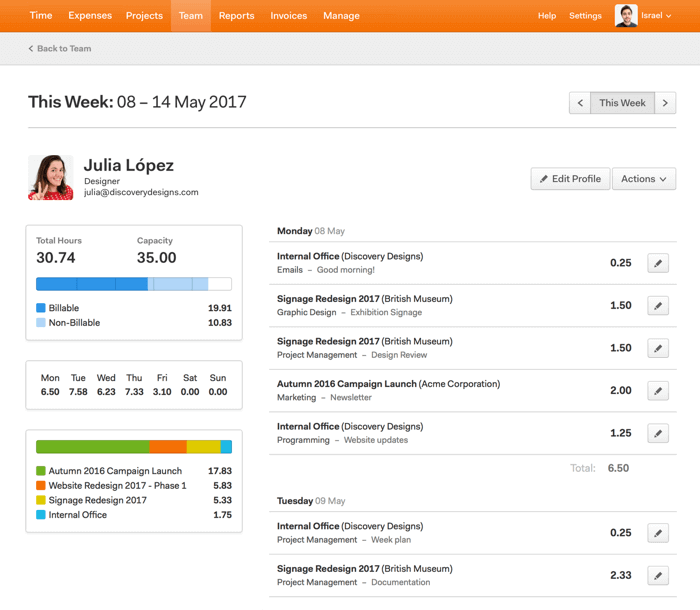
Harvest is a web-based time tracking and invoicing application that offers basic team management features. It lets you track your time and log hours in simple timesheets.
Harvest also makes it easy to determine projects profitability with hourly rates and cost tracking.
Key features:
- Track time online and offline with web, desktop, or mobile app
- Tap to start/stop the project and task timers on a time card, or add time manually
- Simple reports and timesheets with time logs
- Recording expenses by snapping receipt photos and tracking mileage for reimbursement
- Generating and sending invoices
- Timely reminders to submit time (timesheet approval)
- Option to remove idle time from a running timer
- Harvest offers integrations with other tools
Pricing: Harvest offers free time tracking with limited features.
8. FocusMe
Distraction blocking app for building good work habits
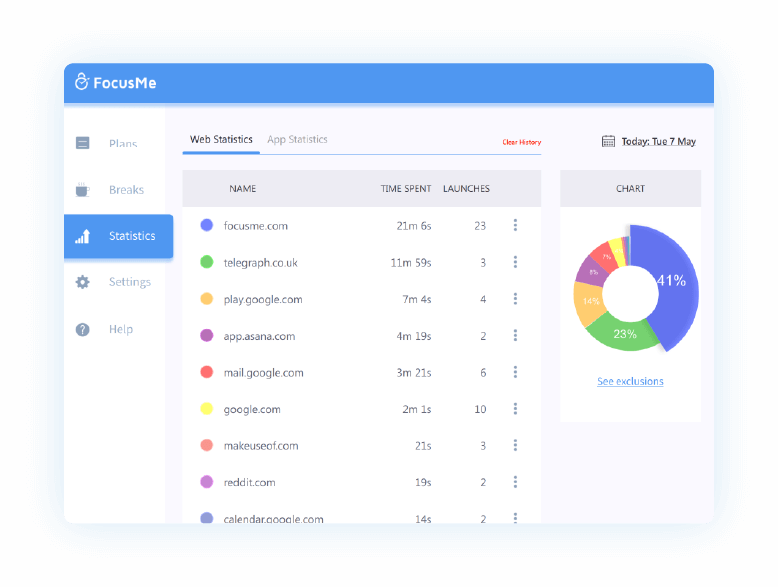
Among the best time tracking apps, you can find tools like FocusMe. It’s a powerful time management app that helps to stay focused. It blocks any type of distractions that you find harmful to your productivity, for example, surfing online and wasting time on unproductive websites.
FocusMe tracks the time you spend on your activities and shows a complete record with time logs for certain activities. It’s a perfect tool for people who want to become more productive and better manage their time.
Key features:
- Planning focus sessions with an automatic scheduler
- Setting time limits for distracting platforms, apps, or websites
- Setting daily limits on opening an email, website, etc.
- Tracking time with the Pomodoro timer
- See time spent on all activities and the number of launches in reports
- You can even have the app prevent itself from being uninstalled
- FocusMe works with macOS, and Windows, and can be used on almost any browser
Pricing: FocusMe offers three subscription plans—Monthly at $6.99 per user per month, Yearly at $39.99 for one year, and 3 Years at $79.99 billed every 3 years.
Pricing: FocusMe offers three subscription plans—Monthly at $6.99 per user per month, Yearly at $39.99 for one year, and 3 Years at $79.99 billed every 3 years.
9. Time Card Calculator
A free time card calculator is a good alternative to a time tracking app. It’s a simple way of keeping a time log that lets you track your time spent on different tasks.
Instead of digging in your memory, you simply write down the figures in the time card calculator and the tool automatically calculates the numbers.
10. Time Log Templates
If you prefer a traditional solution to automatic time trackers, you can use time log templates.
Here are sample time log templates you can use to track work hours:
- Laura Vanderkam 168 Hours: time tracking challenge in which she encourages people to track their time by writing all their activities in a spreadsheet (PDF, Excel, Google Sheets) and keep track of complete task list hour by hour every week
- Excel Templates: Excel offers several time sheet templates for time tracking
- Google Sheets: a weekly timesheet template from Google Sheets
- Weekly schedule templates: to log hours in a weekly time log
- Daily schedule templates: to track daily tasks and better plan day
- Timesheet templates: a list of the best timesheet templates of different types
?Check also our list of best time keeping apps
Improve Time Management with a Time Log!
Whether you’re a business owner, freelancer, or employee, keeping a timesheet can help you boost productivity, become profitable, and accountable.
What’s your take on tracking time, and how do you keep a record of hours? Let us know in the comments!
Link nội dung: https://mozart.edu.vn/to-use-a-time-log-is-useful-for-eliminating-wasted-time-a58632.html